




We may not have the course you’re looking for. If you enquire or give us a call on 01344203999 and speak to our training experts, we may still be able to help with your training requirements.
15 Best 2D Animation Software for Beginners and Professionals
ByThe Knowledge AcademyLast updated on: 23 September 2026
Create stunning animations with 2D animation software tools, including Adobe Animate, Toon Boom Harmony, Moho, TVPaint, and Krita. Explore user-friendly and professional options to design dynamic, creative, and high-quality animations for films, games, marketing, and digital storytelling projects.
What's in This Blog
1. 2D Animation Software Basics: Understand what 2D animation software is and how it supports different animation workflows.2. Top 2D Animation Software: Explore software for beginners and professionals, from free tools to advanced production solutions.3. Pros, Cons and Pricing: Compare the key advantages, limitations, and pricing of each option.4. Software Selection Guidance: Identify suitable tools based on your experience, animation style, creative goals, and budget.5. Future of 2D Animation: Discover how emerging technologies and evolving creative techniques are shaping 2D animation.
2D animation brings characters, backgrounds and stories to life in a flat space using specialised software. What separates a rough sketch from a finished animation often comes down to choosing tools that actually match how you want to work.
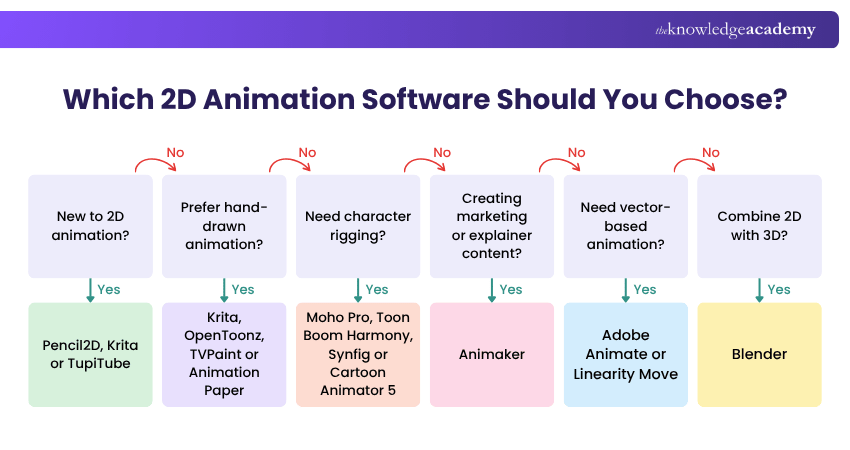
Choosing the right software depends on your project's complexity, artistic style, budget, and skill level. The right tool can streamline your workflow and provide the features you need to turn your creative ideas into engaging animations. Let's learn about them further in the blog!
Important Note
Software prices, subscription plans, and licence terms can change over time. The pricing information provided below reflects availability at the time of writing. Check the software provider's official website for the latest pricing and plan details.
Top 15 2D Animation Software
In this section, we will explore top 2D animation software along with their pros and cons. This will make it easy for you to choose the right tool for your needs. Let's explore them below:
1) Adobe Animate
Adobe Animate is a 2D animation software that also belongs to the Adobe Creative Cloud suite. It allows you to create interactive animations for web, games, and apps using HTML5, JavaScript, and WebGL. You can also create frame-by-frame animations, motion graphics, and character animations using vector and bitmap graphics. Let's explore the pros and cons of this tool:
Pros:
1) Part of Adobe Creative Cloud
2) Supports interactive animations
3) Supports vector and bitmap graphics
4) Integrates with other Adobe software
Cons:
1) Expensive and subscription-based
2) Requires an internet connection and an Adobe account
3) Not very user-friendly or intuitive
4) No free trial or demo
Price: £21.98 per month including VAT on an annual plan billed monthly.

2) Toon Boom Harmony
Toon Boom Harmony is a professional 2D animation software that is used by many studios and animators around the world. It offers a complete set of tools and features for creating stunning 2D animations, from drawing and painting to rigging and compositing. You can also integrate it with other software, such as Photoshop, Illustrator, and After Effects. Let's explore the pros and cons of Toon Boom Harmony:
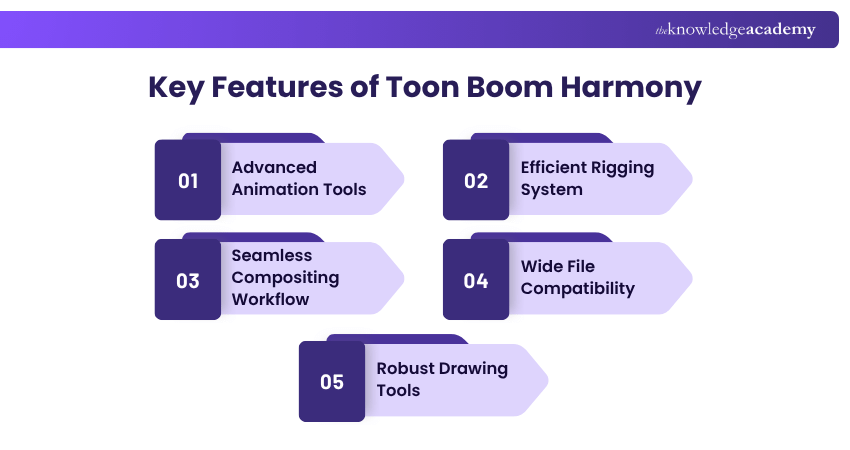
Pros:
1) Professional and industry-standard
2) Powerful and versatile
3) Rich in features and tools
4) Supports raster and vector graphics
5) Supports 2D and 3D integration
Cons:
1) Expensive and subscription-based
2) Complex and steep learning curve
3) Requires high system requirements
4) No free trial or demo
Price: Starting from £19 per month, but it can vary based on the edition and billing term.
Trainer Insight
When learning professional 2D animation software, avoid trying to master every feature at once. Start with the workflow most relevant to your goals, such as frame-by-frame animation, character rigging, or compositing. Once you are comfortable with the core workflow, gradually explore more advanced tools and production techniques.
3) Synfig
Synfig is another free and open-source 2D animation software that lets you create vector-based animations. It has a unique feature called "bones", which allows you to create cut-out animations and manipulate characters easily. You can also use layers, filters, gradients, and transformations to enhance your animations. Here are the pros and cons of Synfig:
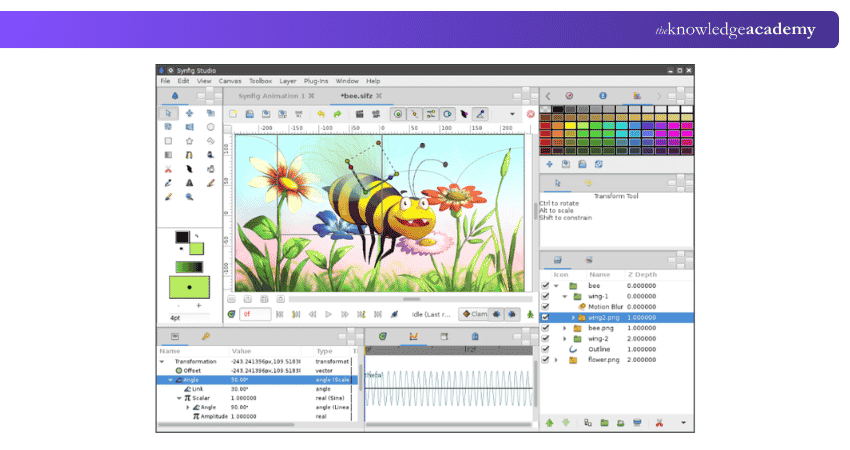
Pros:
1) Free and open-source
2) Supports vector graphics
3) Has a bone system for cut-out animation
4) Has layers, filters, gradients, and transformations
Cons:
1) Outdated and buggy
2) Difficult to use and understand
3) Lacks some basic tools and features
4) No support or documentation
Price: Free
4) Moho Pro
Moho Pro is a 2D animation software that is used to create professional and realistic animations. It has a lot of features and tools for creating vector-based animations, such as drawing, painting, rigging, morphing, and physics. You can also use its Smart Bones, Smart Warp, and Smart Mesh features to create smooth and natural movements. Let's explore the pros and cons of Moho Pro:
Pros:
1) Used for creating professional and realistic animations
2) Supports vector-based animations
3) Has a lot of features and tools
4) Supports Smart Bones, Smart Warp, and Smart Mesh
Cons:
1) Expensive and subscription-based
2) Difficult to use and master
3) Requires high system requirements
4) No free trial or demo
Price: Approximately £320 for a perpetual license, and it may vary based on the retailer.
5) OpenToonz
OpenToonz is also a free and open-source 2D animation software. It is based on the software used by Studio Ghibli, the famous Japanese animation studio. It has a lot of features and tools for creating traditional and digital 2D animations, such as scanning, drawing, colouring, inking, and rendering. You can also use plugins and scripts to extend its functionality. Let's explore the pros and cons of OpenToonz:
Pros:
1) Free and open-source
2) Based on professional software
3) Has a lot of features and tools
4) Supports plugins and scripts
Cons:
1) Complicated and confusing
2) Unstable and buggy
3) Lacks support and documentation
4) Infrequent updates and releases
Price: Free
6) Krita
Krita is a free and open-source 2D animation software that is mainly used for digital painting and illustration. It has a lot of brushes, textures, patterns, and effects for creating realistic and artistic paintings. You can also use its animation mode, called the animation workspace, to create frame-by-frame animations with onion skinning and audio features. Let's explore the pros and cons of Krita:
Pros:
1) Free and open-source
2) Mainly used for digital painting and illustration
3) Has a lot of brushes, textures, patterns, and effects
4) Supports frame-by-frame animation
Cons:
1) Not very focused on animation
2) Lacks some animation features and tools
3) Slow and laggy
4) No support or documentation
Price: Free
7) Blender
Blender is yet another free-to-use and open-source software that is primarily used for 3D animation. However, it can also be used for 2D animation. It has a powerful and comprehensive set of tools and features for creating 3D models, scenes, and animations, especially when compared to Maya. You can also use its 2D and 3D animation mode, called Grease Pencil, to create 2D animations with a 3D feel. Here are the pros and cons of Blender:
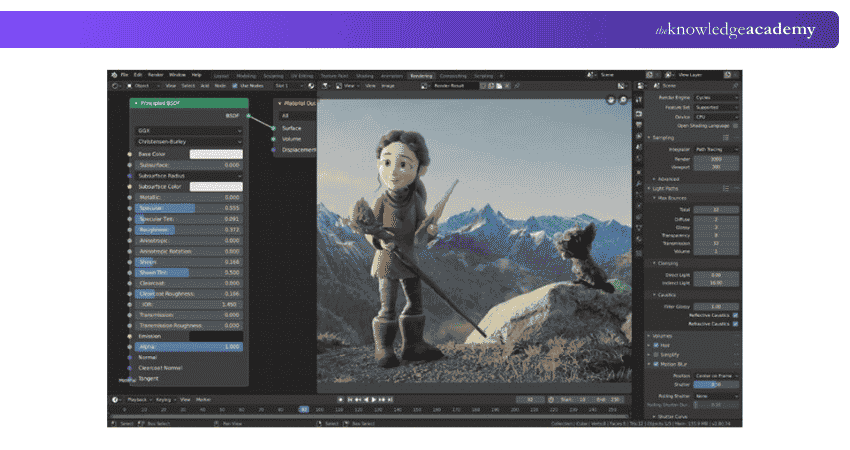
Pros:
1) Free and open-source
2) Powerful and comprehensive
3) Supports 3D and 2D Animation
4) Supports Grease Pencil mode
Cons:
1) The complex and steep learning curve
2) Requires high system requirements
3) Lacks support and documentation
4) Unfamiliar interface for 2D users
Price: Free
Learn the art of 3D modelling for unity with the Blender 3D Modeling for Unity Course – Sign up today!
8) Animaker
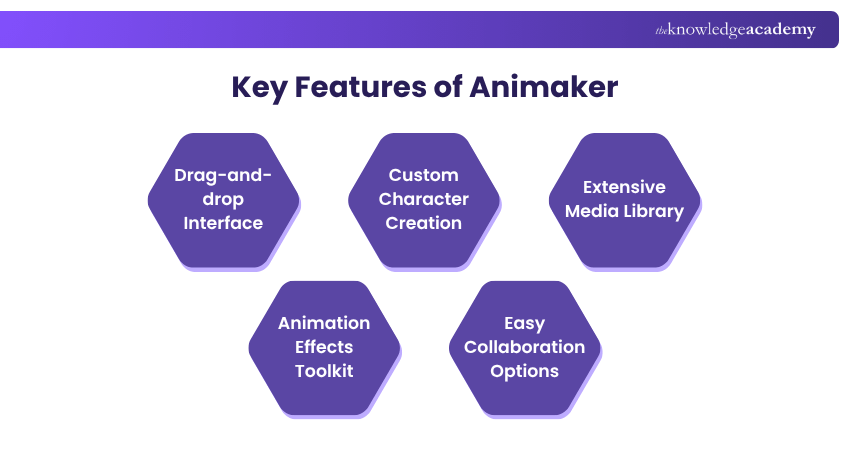
Animaker is a 2D animation software that is cloud-based and online. It lets you create animated videos, presentations and infographics using pre-made templates, characters, backgrounds, and icons. You can also add voice-overs, music, sound effects, and transitions to your videos. You can also use it to export and share your videos online. Let's explore the pros and cons of Animaker:
Pros:
1) Cloud-based and online
2) Easy to use and learn
3) Has pre-made templates and assets
4) Supports voice-overs, music, and sound effects
Cons:
1) Limited and generic style
2) Not very flexible or original
3) Requires an internet connection and an account
4) Has watermark and video length restrictions
Price: Free plan available; paid plans start from approximately £10 per month.
9) TupiTube
TupiTube is also an open-source 2D animation software that is designed for children and beginners and is free. It allows you to create basic and fun animations using drawing, colouring, and painting tools. You can also use frames, layers, onion skinning, and lip-sync features to animate your drawings. Here are the pros and cons of TupiTube:
Pros:
1) Free and open-source
2) Designed for children and beginners
3) Supports drawing, colouring, and painting
4) Supports frames, layers, onion skinning, and lip-sync
Cons:
1) Limited and childish style
2) Lacks some advanced features and tools
3) Not very stable or reliable
4) No support or documentation
Price: Free
10) TVPaint
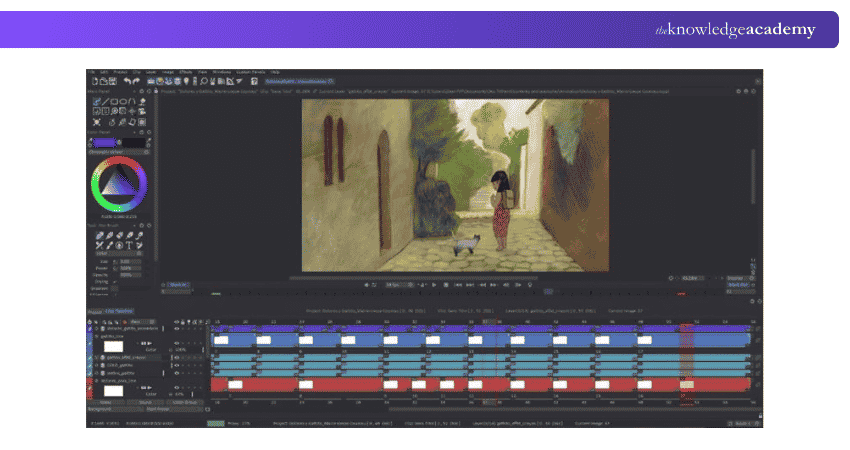
TVPaint is a 2D animation software that is used to create traditional and hand-drawn animations. It has a lot of features and tools for creating frame-by-frame animations, such as drawing, colouring, inking, and shading. You can also use layers, masks, filters, and effects to enhance your animations. Here are the pros and cons of TVPaint:
Pros:
1) Used for creating traditional and hand-drawn animations
2) Supports frame-by-frame animations
3) Has a lot of features and tools
4) Supports layers, masks, filters, and effects
Cons:
1) Expensive and license-based
2) Not very compatible or integrable
3) Not very user-friendly or intuitive
4) No free trial or demo
Price: Approximately £560 depending on exchange rates for the standard version and £1,380 for the professional version.
11) Animation Paper
It is a simple and user-friendly software designed for traditional hand-drawn animations. It allows animators to sketch, plan, and test their ideas quickly. The software is lightweight and focuses on drawing and frame-by-frame animation. It's great for beginners as well as experienced animators looking for a basic tool.
Pros:
1) Easy to use with a clean interface
2) Lightweight software that runs smoothly on most computers
3) Perfect for traditional, frame-by-frame animation
4) Offers basic tools to focus on sketching and animating
Cons:
1) Limited advanced features for professional use
2) No built-in colour or shading options
3) Not suitable for complex or large-scale projects
4) Requires exporting to another software for additional editing
Price: Free public alpha version available.
12) Clip Studio Paint
Clip Studio Paint is a popular software for both drawing and 2D animation. It provides a range of brushes, tools, and effects for detailed artwork. The animation feature is ideal for short clips, offering frame-by-frame tools and onion-skinning. It's widely used by illustrators and animators who enjoy creating high-quality digital art and animations.
Pros:
1) Combines powerful drawing tools with animation features
2) Affordable compared to other professional software
3) Great for detailed and artistic animations
4) Supports both raster and vector graphics
Cons:
1) Limited for creating long or complex animations
2) Can be overwhelming for beginners due to many features
3) Requires a one-time purchase or subscription for updates
4) Animation timeline can feel restrictive for advanced projects
Price: Paid plans and perpetual licences are available, starting from £45.
Learn the art of storytelling with the Video Editing Course - Sign up now!
13) Linearity Move
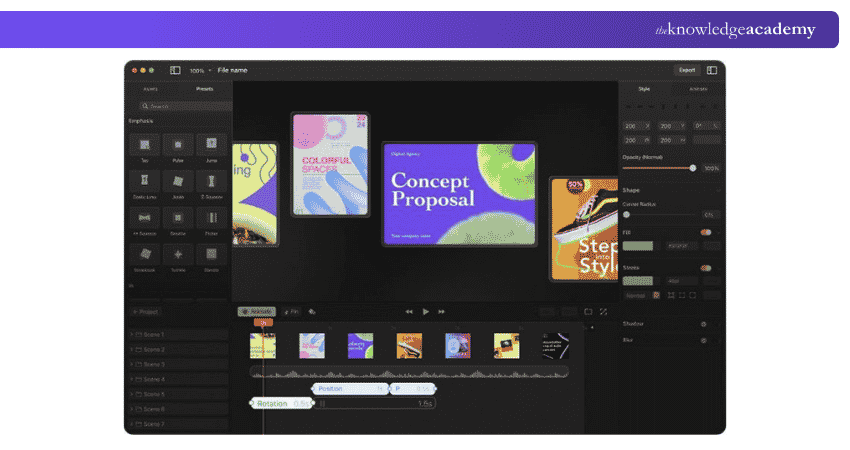
Linearity Move is a modern animation tool focusing on vector-based 2D animation. It offers precise control for designing smooth animations, especially for logos, icons, and illustrations. The software is great for creating sleek, professional designs and is often used by Graphic Designers. It's also optimised for iPads, making it portable and easy to use.
Pros:
1) Free plan available, accessible on multiple devices
2) Excellent for vector-based animations and graphic design
3) User-friendly interface with modern tools
4) Works seamlessly on iPads with touch controls
Cons:
1) Limited features for traditional frame-by-frame animation
2) Not suitable for detailed character animations
3) Advanced users may find it lacking in professional tools
4) Requires a good understanding of vector design
Price: Free plan available, starter pack starts from £7.48, pro costs £22.43, and business is £59.82.
14) Pencil2D
Pencil2D is a free-to-use, open-source 2D animation software. It allows you to create simple hand-drawn animations. It is easy to use, lightweight, and cross-platform. You can draw, sketch, and animate with a pencil, pen, brush, or eraser tool. You can also import and export images, sounds, and videos. Let's explore the pros and cons of this tool:
Pros:
1) Free and open-source
2) Easy to use and learn
3) Lightweight and fast
4) Cross-platform and portable
5) Supports raster and vector graphics
Cons:
1) Limited features and tools
2) No advanced animation options
3) There is no timeline or onion-skinning
4) No support or documentation
Price: Free
15) Cartoon Animator 5
Cartoon Animator 5 is a professional 2D animation software designed for creators who want to bring characters to life with ease. It offers intuitive motion capture, facial animation, and lip-syncing tools. You can animate characters from images, apply 3D motions to 2D models, and use pre-built templates for faster production. Ideal for beginners and professionals alike, it simplifies complex animation workflows.
Pros:
1) User-friendly interface with drag-and-drop functionality
2) Real-time motion capture and facial animation
3) Supports PSD, AI, and vector-based assets
4) Extensive library of motions and templates
Cons:
1) Higher cost compared to many basic 2D tools
2) Steeper learning curve for total beginners
3) Fewer free assets in trial version
Price: Costs approximately £115–£120 for a standard perpetual license, though promotional pricing or subscriptions are frequently available.
Future Trends of 2D Animation
The world of 2D animation is rapidly evolving, blending traditional artistry with advanced digital technologies. Artificial Intelligence (AI) and Machine Learning (ML) are automating tasks such as frame interpolation and lip-syncing, allowing animators to focus more on creativity and storytelling.
Hybrid techniques that combine 2D visuals with 3D depth, Augmented Reality (AR), and Virtual Reality (VR) are becoming increasingly popular, delivering immersive and visually rich experiences. 2D animation is also expanding its reach across modern platforms like short-form videos, mobile apps, and streaming services.
Its versatility, cost-effectiveness, and unique aesthetic appeal continue to make it a favourite among creators. The growing demand for handcrafted and expressive visuals highlights a renewed appreciation for the timeless charm of traditional 2D art.
Bring your creative vision to life with the Animation and Design Training - Join today!

The Knowledge Academy develops accessible learning content across Project Management, IT, Cybersecurity, Data Science, Business Analysis, HR, Accounting and Finance, Leadership and Health and Safety. Its resources combine subject research with clear explanations to help professionals build practical knowledge across a wide range of disciplines.
View Detail

 If you wish to make any changes to your course, please


